


Umami - Recipe Manager
4.6117.00 Reviews
App Specs
- Version
- 1.93
- Updated On
- License
- Free
- Downloads
- 10,000+
- Developer
- Strange Quark
- Categories
- Food & Drink
- Platform
- Android
Screenshots
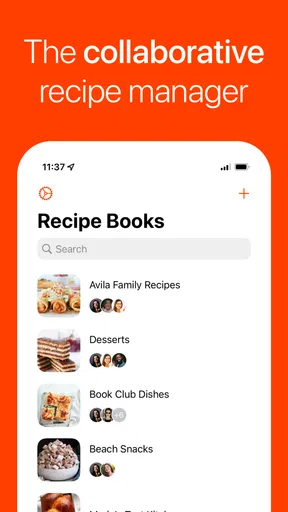


 Analysis by AppCompare
I tend to save recipes in too many places: browser tabs, notes, screenshots, and the occasional message to myself. That makes Umami - Recipe Manager most interesting to me not as another source of food inspiration, but as a way to bring recipes I already find online into one place. Its central promise is practical: import a recipe and use it as part of a meal plan, instead of hoping I remember where I saw it.
That focus makes a difference in everyday cooking. A recipe manager is only useful if it reduces the work between spotting a dish and making it. I like the idea of having the recipe, its ingredients, and a plan for when to cook it connected rather than scattered across several apps. The trade-off is that an imported recipe collection still needs a little attention from me; saving a link is not the same as deciding whether a dish fits my week, pantry, or cooking habits.
Why importing recipes is the useful starting point
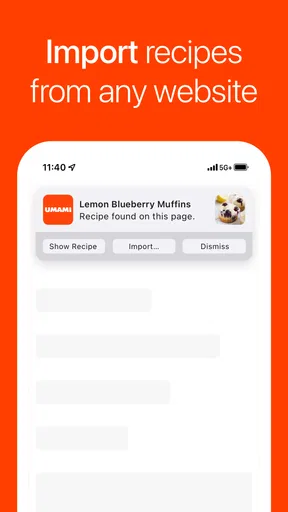
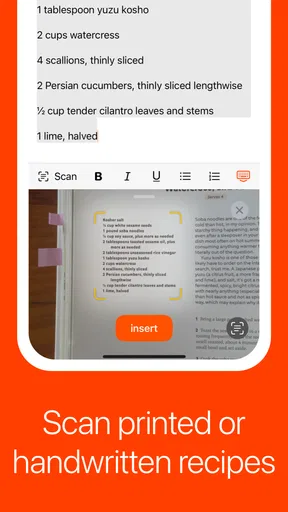
As a Food & Drink app from Strange Quark, Umami is aimed at the problem of collecting recipes and planning meals around them. The import workflow is the capability I would judge it by first. When I come across a recipe on a website, I can save it to my collection rather than copy ingredients and instructions by hand. That is a small convenience once, but it matters when a recipe collection has grown across years of browsing.
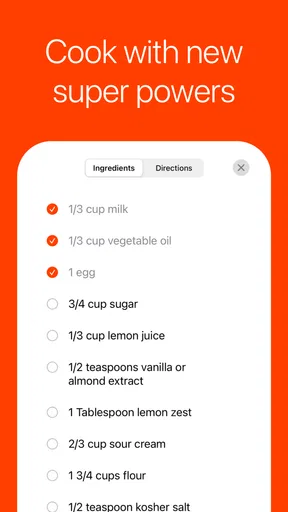
The useful detail is what happens after saving: imported ingredients and instructions can travel with the recipe into the rest of my planning. That gives me a better starting point than a plain bookmark, which only points back to a page and leaves me to find the useful parts again. I would still check an imported recipe before relying on it. If a website lays out its instructions unusually, a quick review helps me catch anything I would otherwise miss while cooking.
How I would make the workflow stick
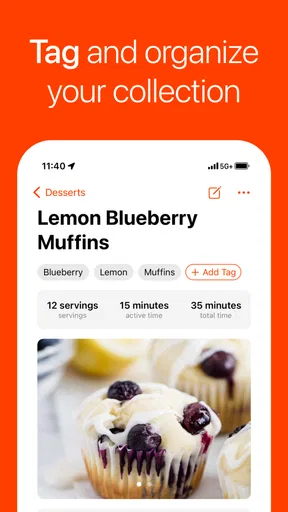
For me, the best approach is to import recipes when I actually intend to try them, not whenever something looks appetizing in a scrolling session. A short collection of dishes I might cook soon is easier to plan from than a huge backlog of untested ideas. I would also use notes or tags to distinguish dependable weeknight meals from recipes I want to experiment with; that makes the collection more useful at the moment I need to choose dinner.
Meal planning is the next step, rather than a separate chore. I can place saved recipes into a weekly plan and use that plan to make the coming days feel less improvised. A realistic use is choosing a few dinners before shopping, then checking the associated ingredients so I can build a list around what I will actually cook. This does not remove every decision—plans change, and ingredients may already be in the kitchen—but it can turn a vague “we should eat better this week” intention into specific meals.
The shopping list connection is especially helpful when I am planning from recipes rather than starting with an empty list. I would treat it as a draft to review, not an unquestionable inventory: check what is already in the cupboard, adjust quantities to suit the people eating, and remove items that are unnecessary. That extra pass is a worthwhile trade-off because it avoids buying every listed ingredient blindly and keeps the list tied to the meals I chose.
Worth Reading Before You Choose

Flipboard Shows What News Apps Must Do Beyond the Feed

Switching to Android Auto Means Rethinking Your Driving Routine

Google Calendar Makes a Crowded Week Easier to Manage

Ludo King Makes the Most of the Minutes Between Plans

Baby Panda World Brings Quick Play to Modern Phones, but Its Game Library Feels Busy

ESPN’s Live Game View Makes Following Close Games Easier
A useful rhythm for a busy week
Imagine I find a soup recipe during a lunch break and save it, then later add it to a night when I have time to cook. I can plan another dish for a busier evening and use the recipes’ ingredients to guide a single shopping trip. If plans shift, the saved recipes remain available to move into another week rather than getting lost in old browser tabs. This is where the app’s value becomes more than storage: it helps connect inspiration with a realistic sequence of meals.
I would avoid filling every day in the plan just to make it look complete. Leaving room for leftovers, a spontaneous meal, or a change of plans keeps meal planning from becoming another rigid obligation. The app can organize choices, but it cannot know what is already in my fridge or how tired I will be on Thursday. Using it as a flexible guide, rather than a strict schedule, seems like the more sustainable way to benefit from it.
Getting Started with Umami
First things first, downloading Umami - Recipe Manager was a breeze. It's available on both Android and iOS, so no matter your device, you're covered. Once I launched the app, the interface greeted me with a clean and intuitive design. No overwhelming buttons or flashy distractions—just a straightforward layout that made me feel right at home.
Setting up was super simple. I quickly registered my account and was ready to dive into the world of recipes. The app makes it easy to import recipes from websites, which is a godsend. I mean, how many times have you found a killer recipe online but forgot to bookmark it? With Umami, you can save it directly to the app with just a link. Plus, it automatically pulls in the ingredients and instructions, saving you from endless copy-pasting. Pretty neat, right?
Features That Cook Up the Magic
One of the features I loved is the shopping list integration. You can add ingredients from your saved recipes directly to your shopping list. It’s like having a personal kitchen assistant. No more scribbling down items only to lose the list later. Just tap, and it’s ready on your phone.
Another cool feature is meal planning. Umami allows you to schedule meals for the week ahead. You can drag and drop recipes into a calendar view, and bam—your week is sorted. This is particularly handy for anyone trying to stick to a meal prep routine or simply wanting to avoid the "what’s for dinner?" dilemma.
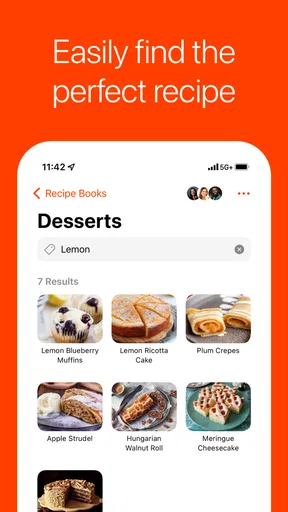
Now, let’s talk about customization. You can tag your recipes, add notes, and even upload your own photos. This personalization means your recipe collection feels truly yours. You can search by ingredient, cuisine, or even cook time. It’s efficient and a time-saver when you're in a pinch.
The Good, the Not-So-Good, and the Delicious
Overall, Umami - Recipe Manager is a delightful app for anyone who loves cooking or wants to get more organized in the kitchen. The app is pretty stable, and I didn’t encounter any bugs during my trial. It’s refreshing to use an app that just does what it says on the tin, without any fuss.
That said, there are a couple of things that could be better. While the app is mostly intuitive, I did wish for a dark mode option. Cooking late at night sometimes means dimming the lights, and a dark mode would be easier on the eyes. Additionally, while the basic features are free, some premium features require a subscription. It’s not a deal-breaker, but something to keep in mind.
The app is free to download, and its age rating is Everyone, so it is approachable for a broad range of home cooks. It has a 4.5 average from 291 ratings and more than 10,000 installs. The current version is 1.93, and optional in-app purchases range from $0.99 to $59.99 per item. I would start with the free experience and decide whether any paid option is useful for my own routine, rather than assuming I need to spend money to organize a few recipes.
Compared with saving links in a browser, Umami gives a recipe a more active role in planning and shopping. Compared with a general notes app, it is more purpose-built for ingredients and meals. But if I mainly want to discover new recipes, follow cooking videos, or keep a simple handwritten-style list, a recipe community or a basic notes tool may suit me better. Umami’s strength is managing recipes I have chosen; it is not a substitute for every kind of food app.
On the bright side, the community aspect of Umami is a hidden gem. You can share your favorite recipes with friends and discover new ones through shared links. It’s like having a tiny, food-loving community in your pocket.
Who gets the most from it
I think Umami will suit cooks who regularly find recipes online and want a practical bridge from saving them to planning meals. It is particularly appealing if the same person handles meal decisions and grocery planning, because the recipe collection can feed directly into both tasks. The tags, notes, and photos also give a growing collection some personal context: I can mark what I changed, remember whether a dish worked, or make a recipe easier to recognize later.
It is less compelling for someone who rarely follows recipes, already has a reliable system they enjoy, or wants the app to make all meal decisions automatically. Importing and organizing still involve choices, and no planner can guarantee every proposed meal fits a changing schedule. I would also consider another option if most of my cooking inspiration comes from sources that are not web recipes, or if I prefer a very minimal checklist with no recipe library attached.
Wrapping It Up
In conclusion, if you're looking to organize your recipe collection and streamline your cooking process, Umami - Recipe Manager is definitely worth checking out. It’s user-friendly, packed with useful features, and makes meal planning a cinch. Sure, it has a few areas for improvement, but don’t we all?
So go ahead, download Umami, and give it a taste test in your own kitchen. Who knows, it might just become your new favorite sous chef!
Happy cooking!
Pros
- Intuitive interface for easy recipe management.
- Seamless ingredient importing from websites.
- Customizable meal planning features.
- Syncs smoothly across multiple devices.
- Supports multiple languages for global use.
Cons
- Limited free version with essential features locked.
- No offline access for recipes and meal plans.
- Occasional sync issues reported by users.
- Requires account creation for full use.
- Some advanced features may need a learning curve.
FAQs for Umami - Recipe Manager
What platforms is Umami - Recipe Manager available on?
Umami - Recipe Manager is available for both Android and iOS devices. You can download it from the Google Play Store for Android or the Apple App Store for iOS. The app is optimized to provide a seamless experience across a variety of devices, ensuring you can access your recipes anytime, anywhere.
Does Umami - Recipe Manager offer a feature to import recipes from websites?
Yes, Umami - Recipe Manager includes a convenient feature that allows you to import recipes directly from popular cooking websites. Simply paste the URL of the recipe, and the app will automatically extract the ingredients and instructions, organizing them neatly in your personal digital cookbook.
Can I customize the layout or categories of my recipes in Umami?
Absolutely! Umami - Recipe Manager allows you to customize how your recipes are organized. You can create your own categories, tag recipes for easy searching, and even adjust the layout to suit your preferences. This personalization helps you find and manage your favorite recipes effortlessly.
Is there a feature in Umami for creating shopping lists?
Yes, Umami - Recipe Manager includes a shopping list feature that makes grocery planning a breeze. When you select a recipe, you can easily add the required ingredients to your shopping list, ensuring you never miss an item. The list is editable, allowing you to add or remove items as needed.
Does Umami - Recipe Manager require an internet connection to access my recipes?
No, one of the key features of Umami - Recipe Manager is its offline accessibility. Once you've saved your recipes, you can access and edit them without an internet connection. This is perfect for when you're cooking in areas with limited connectivity, ensuring your recipes are always at your fingertips.


